Rechargeable AA Batteries: Build a Routine That Makes Reuse Practical
Compare rechargeable AA batteries and disposable cells for controllers and everyday accessories, with guidance on chemistry, chargers, matched sets, and storage.
This guide draws on published documentation and practical use cases, not hands-on testing. It contains no paid product placements or affiliate shopping links. How we work · Affiliate Disclosure
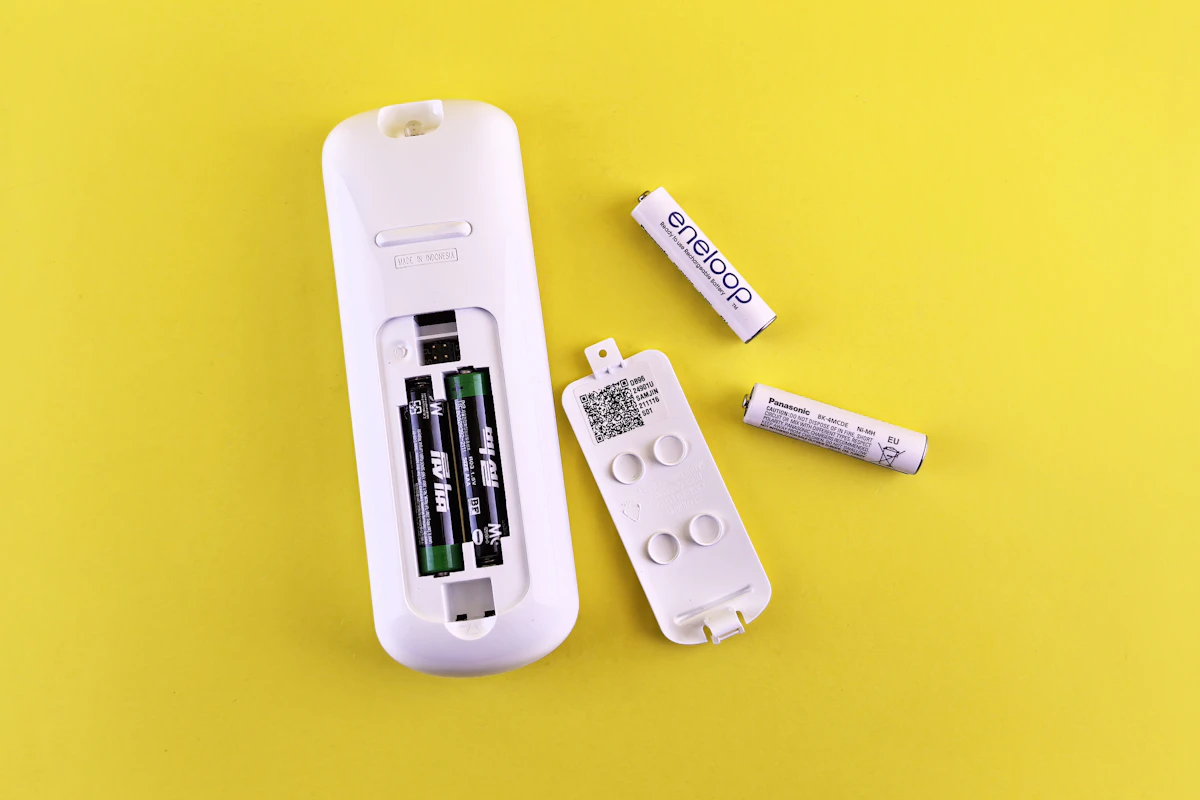
Rechargeable AAs make the most sense in compatible devices you use often, provided you keep a charged spare set and a charger intended for the battery chemistry.
In this guide
A game controller stops halfway through an evening, and the drawer contains three loose AAs with no indication of which are fresh. Rechargeable batteries can replace that guessing game with a repeatable routine. They can also create a different pile of unidentified cells if charging and storage never become organized.
Our assessment favors rechargeable AAs for compatible accessories that consume batteries regularly. For an infrequently used device with specific battery requirements, following its manual matters more than converting everything at once. Start with one recurring use, learn the routine, and expand only when it proves useful.
AA describes size, not the whole specification
A battery’s physical size does not tell you its chemistry, voltage, capacity, or charging requirements. Common nickel-metal hydride rechargeable AAs have a nominal voltage of 1.2 volts, while common alkaline AAs are typically rated at 1.5 volts. That difference does not by itself determine whether a particular device is compatible.
Check the device manual for permitted battery types. Some battery indicators are designed around a particular discharge behavior, so an indicator reading alone may not describe remaining runtime accurately with another supported chemistry. Do not assume that any rechargeable cell with an AA-shaped body is a direct replacement.
This guide concentrates on conventional NiMH rechargeables and their routine, rather than treating every rechargeable AA technology as interchangeable. A charger must explicitly support the batteries being used. Never put a single-use battery into a charger.
Match the approach to the accessory
| Everyday use | Reason to consider rechargeables | Main tradeoff |
|---|---|---|
| Controller used most evenings | Frequent swaps can justify a spare rechargeable set | Someone must keep that spare charged |
| Wireless accessory used regularly | A predictable replacement routine | Confirm device and battery-indicator behavior |
| Rarely used remote | Fewer disposable purchases may still appeal | Charging equipment may add more work than the use warrants |
| Device with a mandated battery type | Follow the device’s specified battery arrangement | Rechargeables may not be an approved substitute |
The right choice depends on actual use, not a universal claim that one chemistry is best for every accessory.
Start with a small, complete system
Count the cells required by one device. Obtain enough compatible batteries for the working set and, if uninterrupted use matters, a matching spare set. Choose a charger with enough suitable bays to handle that routine without constantly splitting sets across several sessions.
Read whether the charger handles each bay independently or has grouping requirements. Check its termination method, indicators, supported sizes and chemistry, and instructions for normal charging. A short advertised charge time is not the only useful feature; clear status information may matter more when the charger sits in a shared room.
Keep the charger somewhere accessible and suitable under its instructions. If retrieving it means emptying a drawer every time, the routine is unlikely to last. A labeled battery case can make readiness easier to understand.
Five steps for a manageable battery rotation
- Check compatibility first. Confirm the device permits the rechargeable type and read both battery and charger instructions.
- Create matched sets. Keep cells used together identified as a group instead of mixing unrelated ages, capacities, or charge states.
- Separate ready and used batteries. Use clearly marked storage positions or cases so the next swap is unambiguous.
- Recharge according to the instructions. Do not improvise a charging schedule or use a different-chemistry charger because the cell fits.
- Review the routine after normal use. If the spare set is never ready, change the storage and charging process before buying more cells.
Panasonic’s guidance recommends grouping compatible batteries used together and avoiding mixed types, ages, capacities, and charge conditions. The practical benefit is straightforward: each set has a more understandable history than a drawer of loose cells.
Capacity is only part of value
A larger milliamp-hour rating can be relevant within a comparable chemistry and test context, but it is not a guaranteed runtime for your controller or mouse. Device load, cutoff behavior, battery condition, and use pattern affect the result.
Published cycle claims also depend on test conditions. Panasonic notes that changes to the relevant IEC test method produce different cycle counts. A large number on a package should not be interpreted as a promise that every household will achieve exactly that many useful recharges.
Compare the cost of the complete setup, including the charger and spare set. Savings depend on how often the batteries actually replace disposable purchases. Avoid assuming a universal break-even point or a fixed environmental benefit without considering use and eventual recycling.
For accessories with built-in batteries, the decision is different. Our power bank guide covers portable USB power, while multi-device charging stations considers organizing devices that charge through their own connections.
Store for the next use
Keep sets identified and follow the manufacturer’s storage guidance. Use a suitable nonconductive case for transport rather than dropping loose batteries among keys and coins. Inspect cells and follow the manufacturer’s guidance if there is damage or leakage; extra charging is not a remedy for a visibly compromised battery.
Choose a disposal or recycling route appropriate to the battery type and your location when a cell reaches the end of useful service. Plan for eventual retirement as well as reuse.
Who should skip the conversion?
Skip it for devices that require a different battery type or where the manufacturer does not permit the proposed substitute. It may also be unnecessary for a remote that seldom needs replacements and whose existing routine is already simple.
If your mouse uses a built-in rechargeable battery, external AAs will not change its charging arrangement. Begin with the accessories you already own rather than replacing equipment solely to standardize batteries.
Frequently asked questions
Can one charger handle all rechargeable AAs?
No. Size is insufficient; the charger must explicitly support the battery chemistry and configuration.
Can I combine one charged cell with one partly used cell?
Follow the manufacturer’s grouping instructions. Mixing charge states in a multi-cell device is not a sound shortcut to a ready set.
Does the largest capacity always offer the best value?
No. Compare the complete routine, including compatibility, storage behavior, charger needs, and how frequently you use the device.
Sources and scope
Official references checked 2026-10-21: Panasonic’s rechargeable-battery FAQ and Panasonic’s AA specification and test-condition notes. Selection and rotation advice is editorial judgment, not measured runtime, cycle-life, or cost-saving results.
Keep exploring

Car USB Chargers: Build a Charging Setup That Fits the Journey
Compare built-in vehicle ports, socket chargers, and passenger charging layouts by power, infotainment compatibility, cable routing, and everyday convenience.
Read the guide
Magnetic Power Banks: When the Snap-On Convenience Is Worth It
Assess magnetic power banks by phone and case compatibility, physical fit, usable energy, wired options, and the realities of carrying a thicker phone.
Read the guide
Multi-Device Charging Stations: One Stand or Separate Chargers?
Compare combined phone, watch, and earbud charging stations with separate chargers, including compatibility, daily schedules, portability, and replacement flexibility.
Read the guide