SD Card Readers: Build a Reliable Camera-to-Computer Workflow
Match SD and microSD cards to reader slots, supported standards, host connections and a careful photo-import routine.
This guide draws on published documentation and practical use cases, not hands-on testing. It contains no paid product placements or affiliate shopping links. How we work · Affiliate Disclosure
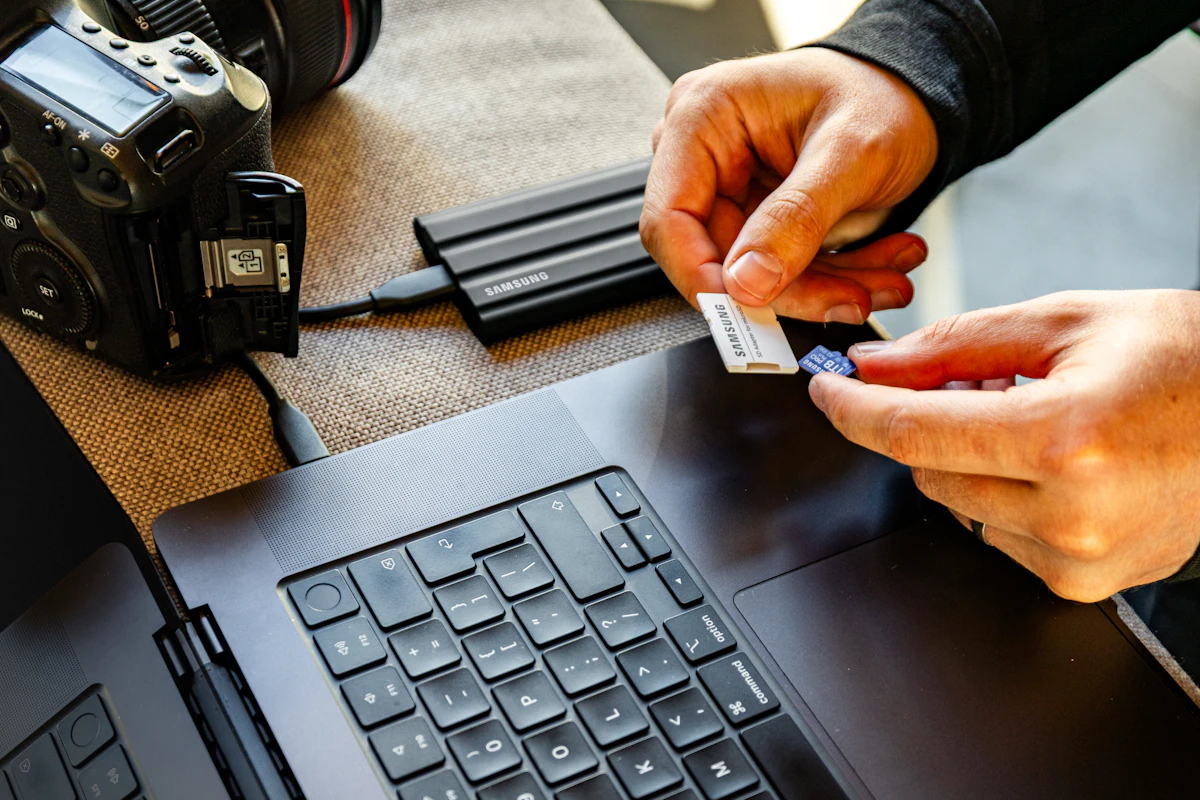
Match the card, reader and host as a complete path. A faster-looking slot or a successful thumbnail preview does not prove that every original has been copied.
In this guide
After a weekend away, you have photographs on a camera’s SD card and clips on an action camera’s microSD card. You want to sort everything on a laptop before the next outing. A card reader seems like a small accessory decision until one slot cannot read the card, a cable occupies the only charging port, or an import application displays thumbnails while the originals remain on the card.
The useful question is how files will travel from the camera to their working and backup destinations. Reader speed matters within that path, but card format, host support and a clear import routine come first.
Compare reader arrangements
| Arrangement | Useful for | Main tradeoff | Verify explicitly |
|---|---|---|---|
| Built-in computer slot | A regular desk workflow with compatible cards | Fixed location and supported standard | Card family and bus support |
| Small single-slot USB reader | One camera and a compact travel kit | Additional adapters may be needed for other cards | Card size and host connector |
| SD and microSD reader | Mixed camera equipment | Two slots do not necessarily work simultaneously | Concurrent access and supported card types |
| Reader inside a hub or dock | A permanent desk with several connections | Ports may share an upstream connection | Reader specification and overall host bandwidth |
Identify the cards you actually use
Read the labels on the cards and the camera manual. Note physical size, capacity family and interface support. SD and microSD describe different physical sizes; labels such as SDHC and SDXC describe capacity-related standards. The reader must support the relevant card standard, not simply have a slot that appears large enough.
A microSD-to-SD adapter can change the physical fit for an appropriate slot. It does not turn the underlying card into a faster storage device or automatically add support for a newer interface. Include the adapter in the compatibility check rather than treating it as invisible.
Card markings also answer different questions. Speed-class symbols concern defined minimum sequential performance under specified conditions. They are not the same thing as the maximum interface rate, and neither is a promise of your computer’s complete import speed. Read the camera’s recording requirements separately from the reader’s transfer specifications.
Follow the complete transfer path
Write the path as card → reader → cable or hub → host → destination storage. The useful performance depends on every stage. A reader supporting a faster card interface cannot create that capability in an older card. Likewise, a capable reader connected through a slower host path cannot deliver its full advertised interface potential.
Check whether the USB cable is permanently attached and whether it reaches the port without leaving the reader dangling. If it is removable, verify the required data capability rather than substituting an arbitrary charging cable. Our USB-C cable guide explains why identical connectors can conceal different functions.
For a combined reader, confirm whether SD and microSD can be accessed at the same time. If simultaneous transfers matter, check the documentation and the shared connection limits. Two visible slots are not evidence that two independent transfers will each receive the maximum advertised rate.
Consider the host application
A laptop file manager and a tablet photo application may expose the card differently. Before travel, confirm that the intended operating system, adapter and application support importing the file types you create. The ability to store a RAW file does not automatically mean every application can render or edit it.
On a tablet, plan the destination and available local capacity. An import may place files in a photo library rather than the folder structure you expected. Exporting unmodified originals can be a separate action from sharing an edited image. Consult the application’s instructions before assuming the file you copied preserves the original format and metadata.
If a USB-C hub supplies both charging and a card slot, confirm that the complete arrangement is supported. Check the workflow with your own equipment before relying on it at a hotel with limited connectivity.
Use an import routine with a clear stopping point
Create a dated destination folder or a clearly named import collection. Copy or import the files, wait for completion, and inspect the result. Compare expected file counts where the workflow exposes them, and open a representative selection including longer clips and files from the end of the shoot.
A thumbnail can come from a preview and does not establish that a full original has been copied. Confirm that the files are accessible from the intended destination after the import completes. Keep the camera card unchanged until the files you need have been checked and an appropriate separate copy exists.
For a larger collection, a portable SSD may be a useful additional destination, subject to its own compatibility and backup limitations. Once the originals are accounted for, follow the camera manufacturer’s instructions for preparing the card for reuse. Avoid accepting an application’s delete-after-import option merely to save a few clicks.
Who should skip a new reader?
Keep a built-in slot if it supports your cards and the transfer time is acceptable. A dedicated reader may add little for someone who imports only a few photographs through a supported direct camera connection. Conversely, a faster reader will not fix unsupported file formats or disorganized copies.
FAQ
Does a UHS label guarantee a particular transfer time?
No. The card’s actual performance, reader support, host path, destination and files all matter. Interface support is one condition in the chain.
Can a reader make an older card faster?
It can remove a limitation imposed by an unsuitable reader, but it cannot give the card a storage capability it does not have.
Should I erase the card as soon as thumbnails appear?
No. Wait for the import to finish, verify the originals at the destination and maintain the copies appropriate to the value of the material before reuse.
Sources and scope
References checked 2026-10-21. Workflow recommendations are editorial judgments, not measured transfer-speed or data-recovery results.
- SD Association: consumer questions explains card and host compatibility considerations.
- SD Association: speed classes distinguishes defined class requirements and bus modes.
- Apple: importing and exporting photos on iPad documents supported import and export workflows.
Keep exploring
Ethernet vs. Wi-Fi for a Home Desk: When a Cable Helps
Compare wired and wireless home connections for calls, gaming, file transfers, and everyday work, with a practical way to identify the bottleneck.
Read the guide
Network Switches: Add Wired Ports to a Home Office
Understand port counts, uplinks, unmanaged and managed switches, power needs and the difference between a switch and a router.
Read the guide
Portable SSDs Compared: Capacity, Connection, and Real Workflows
Understand portable SSD interface speeds, host and cable limits, file-system choices, and the difference between working storage and a backup.
Read the guide